
An authoritative reference worth reading alongside this guide is Small Business Guide to Quick and Easy Email Automation.
Email Automation Triggers That Actually Drive Bookings for Service Businesses
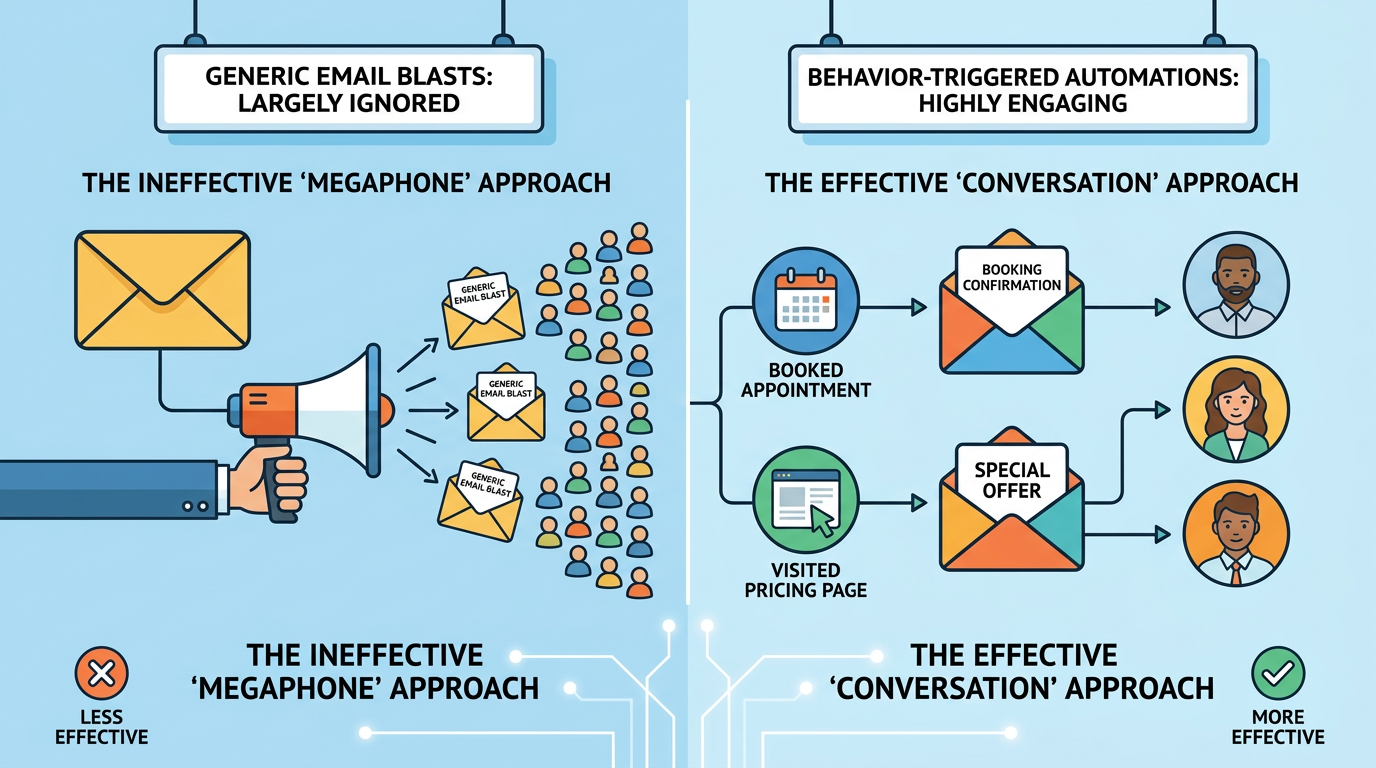
If your phone has been quieter this quarter and your inbox is full of unopened newsletters you sent last month, the problem isn't your subject lines , it's that you're still treating email like a megaphone when it should be a conversation. Most service businesses send the same generic blast to everyone on the list, cross their fingers, and wonder why open rates hover around typically while the calendar stays half-empty. Meanwhile, behavior-triggered emails , the ones that fire automatically when someone does something specific on your site or in your funnel , generate five times the response rate of those bulk sends, according to Salesforce data. The difference isn't magic; it's timing and relevance. When you email someone the moment they abandon a booking form or three days after they visited your pricing page, you're responding to their actual behavior instead of shouting into the void and hoping they're in the mood to listen.
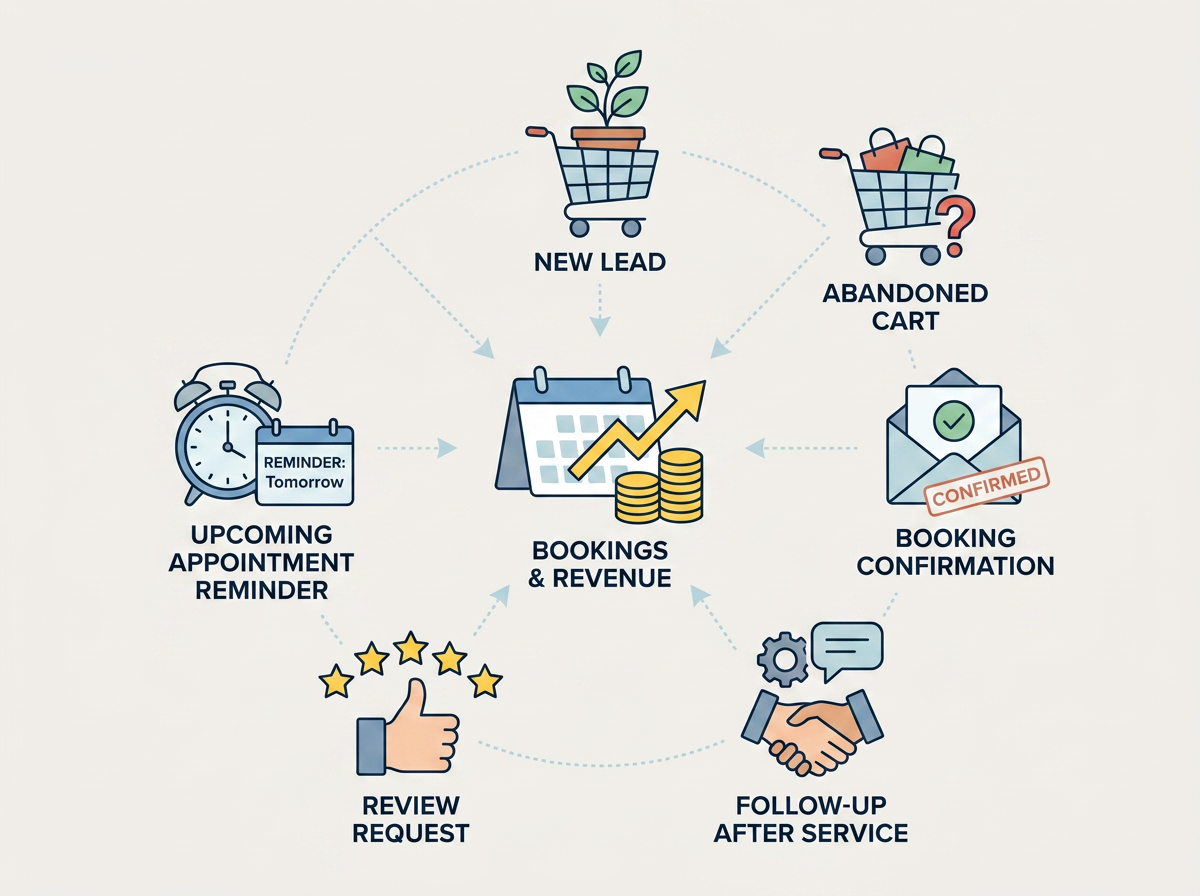
Across the hundreds of service-business consults we've run in South Florida, the pattern is always the same: the owner knows email works in theory, has a list sitting in Mailchimp or Constant Contact, and sends a monthly update that gets skimmed by the majority of recipients and clicked by maybe three people. Then we show them what happens when you replace that monthly blast with six or seven small automations , welcome sequences that start the relationship, booking-confirmation emails that upsell before the appointment, abandoned-cart nudges that recover half the people who got cold feet, post-visit follow-ups that ask for a review while the experience is still fresh , and suddenly the same list is driving most more booked appointments without any extra ad spend. This guide walks through the specific triggers that move the needle for service businesses, what each one should say, and how to set them up so they run on autopilot while you're busy doing the actual work.
Why Behavior Triggers Beat Broadcast Emails Every Time
Here's the short version: broadcast emails go to everyone at the same time, regardless of where they are in the decision process. Behavior-triggered emails go to one person at the exact moment they signal interest, hesitation, or readiness to book. The first approach treats your list like a stadium crowd; the second treats it like a queue of individuals who each walked up to your counter at a different time with a different question. Salesforce research shows that many email marketing ROI now comes from segmented, targeted, and triggered campaigns , not the generic blasts. The mechanism is simple: when someone revisits your pricing page, that signals consideration; when they abandon checkout, that signals hesitation; when they complete a purchase, that signals trust. Each of those moments calls for a different kind of communication, and a broadcast email by definition can't deliver it because it doesn't know what any individual subscriber just did.
In our years setting up email automation for service businesses across Delray Beach, Boca Raton, and Fort Lauderdale, the single biggest mistake we see is treating the email platform like a loudspeaker instead of a conversation engine. The owner writes one really good email, hits send to 2,000 people, waits three days, and then wonders why only 40 of them opened it and two of them booked. Meanwhile, the same platform has workflow tools sitting unused , tools that can watch for a form submission, a page visit, a calendar no-show, or a purchase, and automatically send the right message at the right time. Once those workflows are live, the business stops doing email marketing in the manual sense and starts having email conversations that happen whether the owner is awake or not. The result isn't just higher open rates (though triggered emails average many opens and typically click-through rates, compared to bulk emails that struggle to break typically opens); it's higher booking conversion, because you're catching people when they're already thinking about you instead of interrupting them when they're thinking about lunch.
The Core Automation Triggers Every Service Business Should Run
Not every trigger makes sense for every business, but most service companies , whether you're running a med spa, a home-repair shop, a tour company, or a professional-services firm , will get ROI from the same six or seven automations. These aren't experimental; they're table stakes. If you're not running them, you're leaving money on the table every week.
Welcome Journey: Start the Relationship Before They Forget Who You Are
The welcome sequence triggers the moment someone subscribes to your email list , whether they downloaded a guide, signed up for a discount, or filled out a contact form. The purpose isn't to sell immediately (though a soft offer at the end is fine); it's to deliver bite-size pieces of information that redirect to your website so they can learn more, and to set expectations about what kind of emails they'll get and how often. Most businesses send one welcome email and stop. That's a missed opportunity. A three-to-five-email welcome series, spaced two to three days apart, keeps you top-of-mind during the narrow window when a new subscriber actually remembers opting in. After two weeks, that window closes and they're back to ignoring your name in their inbox.
What we hear most often from South Florida service businesses trying to build a welcome series is "I don't know what to say in emails two through five." Here's the structure that works: email one confirms the opt-in and delivers whatever you promised (the guide, the coupon code, the checklist). Email two introduces your story or your differentiator , why you do this work, what makes your process different, a quick origin story that humanizes the business. Email three showcases social proof: a short client story, a five-star review excerpt, before-and-after photos if you have them. Email four explains your service offerings at a high level and links to your main service pages (this is where strategic content planning becomes critical , the messaging has to match what the subscriber actually needs, not what you want to sell). Email five is the soft ask: book a consult, schedule a free audit, claim an intro offer, whatever your primary conversion action is. Space them 48 to 72 hours apart so they feel like a conversation, not a barrage.
Booking Confirmation: Reassure, Upsell, and Set Expectations All at Once
This one triggers automatically when someone completes an online booking or submits a payment. It should not require any manual work, which means your scheduling software (Acuity Scheduling, Calendly, SimplyBook.me, Square Appointments, or whatever you use) needs to be connected to your email platform or capable of sending a branded confirmation on its own. The confirmation email has three jobs: give peace of mind (yes, we got your booking, here's the date and time, here's how to reschedule if you need to), rebuild trust if there's any reason for hesitation (include COVID protocols, cleanliness measures, what to expect on arrival), and introduce upsell opportunities before the appointment happens.
For service businesses with add-ons , med spas offering upgrades to premium facials, tour companies selling airport transfers or exclusive experiences, home-service providers offering expedited timeslots or premium materials , the booking-confirmation email is the highest-converting upsell moment in the entire funnel. The customer already said yes once; their credit card is already out; they're in buying mode. A single line like "Want to upgrade to our signature package for typically off when you add it now?" with a one-click link will convert at many to most if the offer is relevant, compared to under typically if you try to upsell them cold in a random newsletter two weeks later. Klaviyo's 2024 benchmark data shows that transactional emails (confirmations, receipts, shipping notices) have open rates above typically and click rates above the majority of, compared to promotional emails that average under typically conversions , so this is the email you should be spending time on, not the monthly blast nobody reads.
Pre-Appointment Reminder: Keep Them Excited and Reduce No-Shows
Reminder emails trigger based on time: typically seven days before the appointment, then again 24 hours before. The seven-day version builds excitement, confirms travel details, and promotes last-minute upgrades or add-ons if you have inventory left. The 24-hour version is purely logistical: here's the address, here's where to park, here's what to bring, here's our cancellation policy. Both versions materially reduce no-show rates. A randomized trial in UK general practices found that automated reminders cut missed appointments from most to typically , a most relative reduction. For a service business running 40 appointments a week, that's one extra kept appointment every week, which over a year is 50+ appointments you would have lost to no-shows.
The mistake we see most often with reminder emails is making them too long. The person already booked; they don't need to be re-sold. They need three pieces of information: when, where, and what to do if something changes. Everything else is noise. If you want to include an upsell offer in the seven-day reminder, keep it to one sentence and one button , "Still time to add a deep-tissue upgrade for $40" , and don't bury the core reminder info below it. The 24-hour reminder should be even shorter: subject line "Your appointment with [Business Name] is tomorrow at [Time]", body text with address and parking instructions, one-click reschedule link at the bottom. That's it. Anything longer and you risk them skimming past the important part.
Abandoned-Cart Recovery: Nudge the People Who Got 90% of the Way There
Abandoned-cart emails are the highest-converting automation most service businesses aren't running, because most service businesses don't think of their booking process as a "cart." But if you have an online scheduler where someone picks a date, fills out their info, and then bails before hitting "confirm," that's an abandoned cart. If you sell packages or memberships and someone adds one to their cart on your website and then closes the tab, that's an abandoned cart. And those people convert at many on average when you send them a reminder within 24 hours, compared to many for a generic promotional email, according to Klaviyo's benchmarks.
The abandoned-cart email has one job: remind them what they left behind and make it easy to finish. Subject line: "You left something behind" or "Still interested in [Service Name]?" Body: "Hi [Name], you started booking [Service/Package] but didn't finish. Here's a link to pick up where you left off: [one-click link that takes them back to the checkout page with their info pre-filled]." If you want to sweeten the deal, add a small discount code good for 48 hours , "Complete your booking by [Date] and save the majority of with code FINISH10" , but don't make the discount so big that people start abandoning on purpose to trigger it. A the majority of or many nudge is enough to convert fence-sitters without training your audience to game the system.
Most scheduling platforms (Acuity, Calendly, Square Appointments) and e-commerce tools (Shopify, WooCommerce, Squarespace Commerce) have built-in abandoned-cart recovery, but they're often turned off by default or require a paid plan tier. If your platform doesn't support it natively, you can build the automation in HubSpot, ActiveCampaign, Klaviyo, or Mailchimp by tracking when someone hits your booking page, starts the form, and then leaves without a confirmation event firing. It's a 20-minute setup that will pay for itself the first week it's live.
Post-Visit and Re-Engagement Automations: Turn One Booking Into Three
The appointment happened, the service was delivered, the customer left happy , and then most businesses do nothing until the next generic newsletter. That's where the long-term revenue lives, and it's the part of the funnel most service businesses leave completely unautomated.
Post-Visit Follow-Up: Ask for the Review While It’s Fresh
This automation triggers 24 to 48 hours after the appointment or service delivery. The goals are twofold: gather feedback (so you can fix problems before they become public one-star reviews) and collect public reviews (so future customers see social proof when they're deciding whether to book). The email should be short and personal: "Hi [Name], thanks for trusting us with [Service]. We'd love to hear how it went , if you have 60 seconds, would you leave us a review?" Then include direct links to Google, Yelp, or whatever review platform matters most for your business. BrightLocal's 2023 survey found that the majority of consumers used Google to evaluate local businesses, and most trust online reviews as much as personal recommendations from friends or family , so a steady stream of fresh reviews isn't just nice to have; it's the difference between showing up on page one of local search and getting buried on page three.
For service businesses that rely on local visibility , HVAC, plumbing, lawn care, med spas, salons, auto repair, anything where "near me" searches drive most of your leads , the post-visit review-request email is the single highest-leverage automation you can run. If you're already investing in Google Maps marketing services to improve your local map rankings, automating the review-request process is what keeps those rankings from sliding backward. One five-star review per week, sustained over six months, will do more for your local SEO than any amount of on-page optimization, because Google's local algorithm weighs review velocity and recency heavily. The automation makes it effortless: every completed appointment triggers the email; every email generates a small percentage of reviews; those reviews compound over time into a meaningful ranking advantage.
Re-Engagement / Win-Back: Recover the Customers Who Went Quiet
This automation triggers when a subscriber or past customer hasn't opened an email or booked an appointment in 90, 120, or 180 days (you pick the threshold based on your typical rebooking cycle). The goal is to recover lapsed customers with an offer strong enough to break through their inertia , usually a bigger discount than you'd offer to an active customer, or exclusive early access to something new. The subject line should acknowledge the silence without sounding passive-aggressive: "We miss you, [Name]" or "It's been a while , here's the majority of off to come back." The body explains what's new since they last visited, reintroduces your core offer, and presents the incentive clearly.
Win-back emails convert at lower rates than welcome or abandoned-cart automations (most of the list is genuinely gone), but the ones who do convert tend to be high-value because they already know your business and you're not starting from zero trust. The key is offering an irresistible incentive , not a token most off, but a substantial discount, a free add-on, or exclusive access to a new service or package. For tour companies and experience-based businesses, this is also a good place to personalize based on past behavior: if someone previously booked a European river cruise, send them an email highlighting upcoming European itineraries or a spa-package upsell for their next adventure. Personalization increases relevance, and relevance is what breaks through inbox clutter when someone has been ignoring you for four months.
Phorest Salon Software's industry data shows that returning clients account for most salon revenue on average , a stat that applies to most service businesses where repeat visits are possible. If two-thirds of your revenue comes from people who've already booked once, automating the re-engagement sequence isn't optional; it's the difference between running a sustainable business and constantly chasing new leads to replace the old ones who drifted away.
How to Actually Implement These Without Becoming a Full-Time Email Marketer
Reading a list of automations is one thing; building them is another. Most service-business owners get halfway through setting up a workflow in HubSpot or ActiveCampaign, realize it's taking three hours, and bail. Here's the short version of what actually works.
Start with one automation, not six. Pick the one that will generate the most immediate ROI for your business. If you're losing many bookings to no-shows, start with the appointment-reminder automation. If you have a leaky checkout process, start with abandoned-cart recovery. If you get 20 new email subscribers a week and none of them ever book, start with the welcome sequence. Build that one automation, test it for two weeks, and then move to the next one. Trying to launch all six at once guarantees you'll do all six poorly and then turn the whole system off in frustration.
Use your scheduling software's native automations if it has them. Acuity Scheduling, Calendly, Square Appointments, SimplyBook.me, and Bookingkit all have built-in email automation for confirmations, reminders, and follow-ups. You don't need a separate ESP for those; you just need to turn them on and customize the templates. The only reason to route those emails through Mailchimp or Klaviyo is if you want more advanced segmentation or if you're running upsell offers that require integration with your e-commerce platform. For a basic reminder or confirmation, the built-in tools are faster to set up and one less integration to maintain.
For behavior-based triggers that your scheduling tool doesn't handle , welcome sequences, abandoned-cart recovery, re-engagement , you need a marketing-automation platform. The big ones are HubSpot (expensive but powerful), ActiveCampaign (mid-tier pricing, good workflow builder), Klaviyo (best for e-commerce and paid experiences), Mailchimp (cheapest, limited automation on the free plan), and Constant Contact (simple but less flexible). All of them let you build workflows that trigger based on form submissions, page visits, email opens, purchase events, and time delays. If you already have one of these platforms and you're only using it to send monthly newsletters, you're using the majority of what you're paying for.
The hardest part isn't the tech; it's writing the emails. Most service-business owners can figure out how to click "add a delay" and "send email" in a workflow builder. What stops them is staring at a blank email template and not knowing what to say. If that's you, this is where modern content marketing services pays off , either you invest the time to write six to eight good email templates up front, or you hire someone who already knows how to write conversion-focused email copy and can knock them out in an afternoon. Either way, the writing is the bottleneck, not the automation setup.
Compliance and Deliverability: The Boring Stuff That Keeps You Out of Spam Folders and Legal Trouble
Nobody wants to read this section, but if you skip it you'll either end up in spam or you'll end up with a CAN-SPAM fine, so here's the short version.
CAN-SPAM Act (U.S.): Every marketing email you send must include a clear way to opt out (an unsubscribe link that actually works), your valid physical postal address (a PO box counts), and honest subject lines that aren't deceptive. Transactional emails , confirmations, receipts, password resets, appointment reminders that don't include promotional content , are mostly exempt, but the moment you add an upsell offer or a "check out our new service" pitch, the email becomes commercial and CAN-SPAM applies. The FTC has a compliance guide that explains the rules in plain English; it's worth skimming once so you don't accidentally violate it and get hit with a $50,000 penalty per email.
GDPR (EU): If you have any EU-based subscribers , even one , you need a lawful basis for processing their data (usually explicit consent, meaning they checked a box that said "yes, email me"), and you need to be transparent about how you're using their information. Automated profiling (sending different emails based on behavior) is allowed under GDPR, but you have to disclose it in your privacy policy and give people the right to opt out of automated decision-making. The European Commission's data-protection guidance covers this in detail; the short version is "don't buy lists, get real consent, and let people unsubscribe easily."
TCPA (U.S., SMS): If you're sending appointment reminders or booking confirmations via text message instead of email, the Telephone Consumer Protection Act requires prior express written consent before you text someone's cell phone using an autodialer. That means a checkbox on your booking form that says "I agree to receive text reminders" isn't optional; it's legally required. The FCC's consumer guide explains the rules; violating them can cost $500 to $1,500 per text, and class-action lawyers love TCPA cases because the statutory damages add up fast.
The common thread across all three regulations: get permission, make it easy to opt out, and don't be deceptive. If you follow those three principles, you'll stay out of trouble. If you ignore them because "everyone else does," you're betting your business that you won't be the one who gets made an example of. Not a bet we'd take.
What Good Email Automation Actually Looks Like in Practice
Here's a real-world example from a Boca Raton med spa we worked with last year. When we started, they had 3,200 email subscribers, sent one newsletter per month that got opened by the majority of recipients, and booked maybe two or three appointments per email send. Their scheduling software (Acuity) was sending plain-text confirmation emails with no branding and no upsell offers. They had no welcome sequence, no abandoned-booking recovery, no post-visit follow-up asking for reviews. The owner was frustrated because she "tried email marketing" and it "didn't work."
We built six automations over the course of a month: a three-email welcome sequence for new subscribers, a branded booking-confirmation email with a typically-off upsell offer for add-on services, a seven-day and 24-hour reminder sequence, an abandoned-booking recovery email that triggered if someone started the scheduler and didn't finish, and a post-visit email that went out 48 hours after each appointment asking for a Google review. We also set up a 120-day re-engagement sequence for past clients who hadn't booked in four months, offering them a "we miss you" discount.
Three months later, the med spa was booking many more appointments from the same email list, with no increase in ad spend. The welcome sequence was converting most new subscribers into booked consults within two weeks. The booking-confirmation upsell was adding an extra $1,800 per month in add-on revenue. The post-visit review requests were generating 15 to 20 new Google reviews per month, which pushed them from position four in the local map pack to position one for their primary keyword. The abandoned-booking recovery email alone was recovering six to eight lost bookings per week , appointments that would have evaporated if we hadn't nudged people within 24 hours.
The owner's time investment after the initial setup: zero hours per week. The automations ran themselves. She still sent a monthly newsletter when she had something to say, but the newsletter was no longer carrying the entire email-marketing load. The automations were doing the heavy lifting , starting conversations with new subscribers, recovering hesitant prospects, upselling existing customers, and keeping past clients engaged , while she focused on delivering the actual services.
That's what email automation is supposed to look like. Not a part-time job you dread every month, but a set of small machines that run in the background and generate bookings while you sleep.
Next Steps: Pick One Trigger and Build It This Week
If you made it this far and you're thinking "I should really set some of this up," here's the action plan that actually works: pick one automation from this list , whichever one will have the biggest immediate impact on your business , and build it this week. Not next month. Not when you have time. This week. Block two hours on your calendar, open your email platform or scheduling software, and build the workflow. Write the email copy, set the trigger conditions, test it with your own email address, and turn it on.
Once that first automation is live and you see it working (and you will , the data doesn't lie), build the second one. Then the third. By the end of the quarter you'll have five or six automations running, your email list will be generating most to the majority of more bookings than it is today, and you'll wonder why you waited so long to do this.
If the idea of building workflows and writing email copy sounds like the last thing you want to spend your afternoon on, that's what we do. Good At Marketing has been setting up email automation for service businesses across South Florida since 2017 , med spas, tour operators, home-service companies, professional-services firms, wellness practices, you name it. We'll audit your current email setup, recommend which automations will move the needle for your business, write the copy, build the workflows, and hand you a system that runs on autopilot. You can also route visitors who are tracking pricing-page visits or repeat site behavior through On Page SEO Services so those pages convert when the automation brings them back.
Ready to stop sending newsletters into the void and start having actual email conversations that drive bookings? Contact us for a strategy call. We'll walk through your current email process, show you where the biggest leaks are, and map out a 90-day automation plan that fits your business. No fluff, no four-month onboarding process , just the triggers that work and a clear plan to get them live.
Further reading: CAN-SPAM Act: A Compliance Guide for Business; Stop Unwanted Robocalls and Texts.
Marketing that works, in your inbox
AI search & SEO news, what’s working right now, and guides we actually use with clients. A couple of emails a month, no spam.
Unsubscribe anytime. We treat your inbox the way we treat our clients’ brands.